Tuesday, June 11, 2013

Flashing IT firmware on a LSI 9211-8i HBA from a USB stick

Recently I needed to test different firmware versions on some LSI 9211-8i PCI-E 8x SAS 6Gbps HBA's for work. Updating the firmware seemed like a momentus pain afer reviewing the plethra of guides online. Here is my simplifyed version:

Step 1: Download the HP Flash Utility and MS-DOS system files

LINK

Step 2: Install the HP Flash Utility and extract the MS-DOS system files


Step 3: Download the latest LSI firmware: 9211_8i_Package_P16_IR_IT_Firmware_BIOS_for_MSDOS_Windows

LINK

Step 4: Extract the LSI firmware zip.

 Step 5: Follow the great guide from the link in Step 1 on Seven Forums for creating your dos bootable USB thumb drive.

Step 6: Copy the following files from the LSI firmware package to your thumb drive.

2118it.bin - Under Firmware\HBA_9211_8I_IT
sas2flsh.exe - Under sas2flash_dos_rel
mptsas2.rom - Under sasbios_rel


Step 7: Plug your USB stick into the system you are flashing the 9211-8i controller in and boot off the thumb drive.

*IMPORTANT: DO NOT TRY TO FLASH MORE THEN (1) HBA CARD AT A TIME. Remove any additional controllers and repeat the next steps. You could perminatly brick multiple cards!*

Step 8: View the installed cards using # sas2flsh -listall
(Please ignore the onboard LSI 2308 controller)
 
Step 9: Delete the existing firmware # sas2flsh -o -e 6


Step 10: Update the firmware and bios # sas2flsh -f 2118it.bin -b mptsas2.rom

 All done!

 
There, that was not too bad. You can check the update by running # sas2flsh -listall and power cycle the machine- don't forget to remove the USB stick.
 
Marc

Tuesday, May 7, 2013

ESXi All-In-One three month update + Cisco lab update

After realizing it had been weeks since I last logged in to my colocated ESXi All-In-One, I was surprised to find it still chugging along with no complaints. The Crucial M4's are still happily running and the hardware seems as solid as ever. Since this was a spare parts/ebay special/junk bin build, I never expected it to be quite as solid as it is.

Last week, I added 24x 1.5TB Seagate drives in a Supermicro 846 chassis. Hopefully I will be adding a ZIL/L2ARC cache drive here in the future to help speed up these spindles, but for now they will be setup in two RaidZ2 pools and acting as a backup for the SSD pools.


As far as the Cisco Lab update goes, I finally decided I must get off my ass and get this cert finished. My Jr. Admin has shown interest in learning Cisco and with our works recent decision to fund certifications, I can't think of a better time. This picture is a few weeks old, but it shows a majority of the gear.

(1) 881w
(1) ASA5505
(3) 1841 
(1) 2821
(1) 2621XM
(1) 1760
(1) 3640
(4) 2950 Switches
(1) 3750-48 Switch

Ideally for the CCNA I will end up with just (3) 1841 and (3) 2950's, using the 3750 as needed for some of the newer commands. Otherwise, with a few cables we should be good to start studying and doing practice labs. Can't wait. For the CCNP I will need to add at least another ASA, but that can wait for now.

Wish us luck- 
Marc


pfSense ver 2.0- Replacing the Cisco 881w with a home-made ITX system for under $200


After using a rather solid Cisco 881w for my home router the last year, I finally started looking at building a new pfSense router. The Cisco worked fine, but I missed the lower latency of the pfSense box and the familiar web interface I had used for years. I started browsing for hardware with the following requirements:

1) No fan
2) Powerful enough for a 100mb fiber line
3) Low power
4) Small form factor 
5) Under $200 new

After missing a 1u Supermicro D525 on ebay for a steal, I started browsing ALIX boards. I was mainly interested in the ALIX2D3, however after doing some research it appears to putter out around 80mb's. Next up were the latest gen Intel Atom boards- I had recently used one at work and was very impressed. However the model was ~$350 all said and done. I finally found this: 


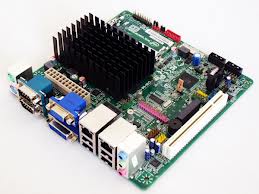
The Intel D2500CCE. A fan-less dual core Atom running at 1.86ghz, DDR3 SO-DIMM, Dual Intel 1000mb NIC's for $99. It is very similar to the older D525- but with dual gigabit nics. For a extra $40 I added a well ventilated ITX case. Some time ago during fall cleaning at work, I scavenged a Pico 120w powersupply and brick from the junk bin which fit the bill perfectly. I could have ordered everything as a kit from www.Mini-box.com if I did not already have the power supply. I added a 4gb stick of Crucial DDR3 10600 for $19 and a used $40 Intel X25-M for a grand total of $199. 

The case and MB.
    

Motherboard installed.


Pico Powersupply.                                       


The Mini-Box M350 vented case.


Loading pfSense 2.03 RC.                 

It works!


After I burn it in for a few days, I will switch it out with the Cisco router I am currently running. Install was an absolute breeze and the entire process from assembly to running took less then 1 hour. Eventually I will dig out the Kill-A-Wall and IR thermometer to check power usage and heat output. So far it is running warm to the touch, but this summer in our old non AC house will be the real test.

Until next time!

Marc


Wednesday, March 13, 2013

Multiple DHCP servers on a single VLAN- HP 5406zl Multiple IP Helper-Address

Have you ever wanted to add a second DHCP server in case the first went offline? It's a lot simpler then you think. I recently set this up for our main office, as with our aging VM hosts I did not want
to take everyone offline if we lost one of the hosts. For this we need two servers- I already had two Server 2008r2 VM's setup: AD1 and AD2. They were already configuered for split DNS. Simply add the DHCP role to the second server and setup your scopes. It is important to A) Split your scopes- they can not overlap, and B) Split your DNS- If AD1 goes offline, you loose DHCP and DNS. See the example below.
 
Example:
 
AD1-DHCP: 10.10.10.3 
         Scope: 10.10.10.50-149
         DNS1: 10.10.10.3
         DNS2: 10.10.10.4
 
AD2-DHCP: 10.10.10.4
         Scope: 10.10.10.150-250
         DNS1: 10.10.10.4
         DNS2: 10.10.10.3
 
On our HP switches, I had to configure a second IP Helper-Address:


Before:
 
Command:


Result


As with most HP switch changes, make sure to do a WR MEM and RESET- to apply your changes.
Enjoy!

Saturday, February 23, 2013

Cisco ASA 8.4 Static PAT- Can't access your external website interally?

Ah the ASA, nothing like a good headache for a Saturday night. I just setup my ASA5515-x and got my external port fordwarding setup (guide) and my interanlly hosted webserver live. It would resolve on my phone or a remote computer just fine. Locally, it would just time out. In 8.4 they removed the DNS rewriting found previously. Here is the solution.

External IP: 50.50.50.50
Internal Webserver IP: 192.168.2.30

object network Public_Server
host 50.50.50.50
 
object network Internal_Server
host 192.168.2.30
 
nat (inside,inside) source dynamic any interface destination static Public_Server Internal_Server
 
same-security-traffic permit intra-interface

Works great now!

https://supportforums.cisco.com/thread/2157443

Monday, February 4, 2013

ESXi Colo part 2: The All-In-One storage and VM host

I had to delay this post due to some projects at work- Enjoy!

After a few weeks of waiting on various parts, I finally have everything together for my ESXi colo box. I finished assembling it after the holidays and got it burnt it in. I left the major config for some downtime around the office. Of course the day I got it racked an immediate work related need for a lab environment came up. The last few days I have spent my spare time configuring the storage passthrough and setting up the All-in-One.

If you are not familiar with the concept of a All-in-One ESXi host, I suggest you check out www.napp-it.org. Gea, the creator of Napp-IT has inspired a new line of high performance, compact, All-in-One storage/VM hosts. From his background in education and small budgets, he decided to ditch the traditional SAN "network" and build redundant All-in-One Hypervisor and storage hosts.

The basic requirements/recommendations of a All-in-One are as follows:

Supermicro X8/X9 motherboard supporting VT-D
Fast processors (Think Dual Quad 2.5 min or an e5-26xx hex core)
As much ram as you can afford (32gb+)
LSI (or rebadged IBM) HBA's
(2) SSD's for SAN OS
X of disks for the shared Pool
SSD's for Cache drives if possible
USB Key for Hypervisor

My system fits the bill perfectly.
X8DTE Motherboard
(2)Intel x5650 processors
192GB DDR3 10600 ECC REG
(2) LSI 9211-8i HBA
2 160gb Intel SSD for Open Indiana
4 Crucial M4 256gb SSD cache/log/ect
4 Crucial M4 512gb SSD VM OS drives
2 3TB Seagate 7200rpm Spindle archival drives
16GB HP Thumbdrive for the Hypervisor

The initial setup via Gea's guide is very simple:
1) Load ESXi onto your thumb drive
2) Install OpenIndiana on to a 40gb Datastore on OS SSD1
3) Pass the LSI HBA through to the OI VM
4) Install Napp-It and mirror the OS drives
5) Create a storage pool with the disks passed through the HBA and enable NFS (In my case, RaidZ10)
6) Create a Vswitch in ESXi with a second dedicated NIC for SAN traffic using the vmnet driver
7) Assign static IP's to the new SAN nic in OpenIndiana
8) Add the datastore in ESXi
9) Install vmware tools on OpenIndiana
10) Start benchmarking!

So far I have seen 1100Mb/s Read and 325Mb/s Write. It has been up solid for a month now hosting ~5 test VM's and I can't wait to start loading it down. Next up I will attach a large pool of spindle disks for some Raid Z testing.


Designing a network for a Small-Medium Business

Last year I started on the redesign of my works network. I wish I had read this article first! It condenses all the individual knowledge I gathered online in to a single, easy to understand article.

http://arstechnica.com/business/2010/02/designing-a-highly-reliable-small-medium-business-network/